
Home / Articles / Victron Cerbo GX on a Boat: What It Does, Wiring and VRM Remote Monitoring
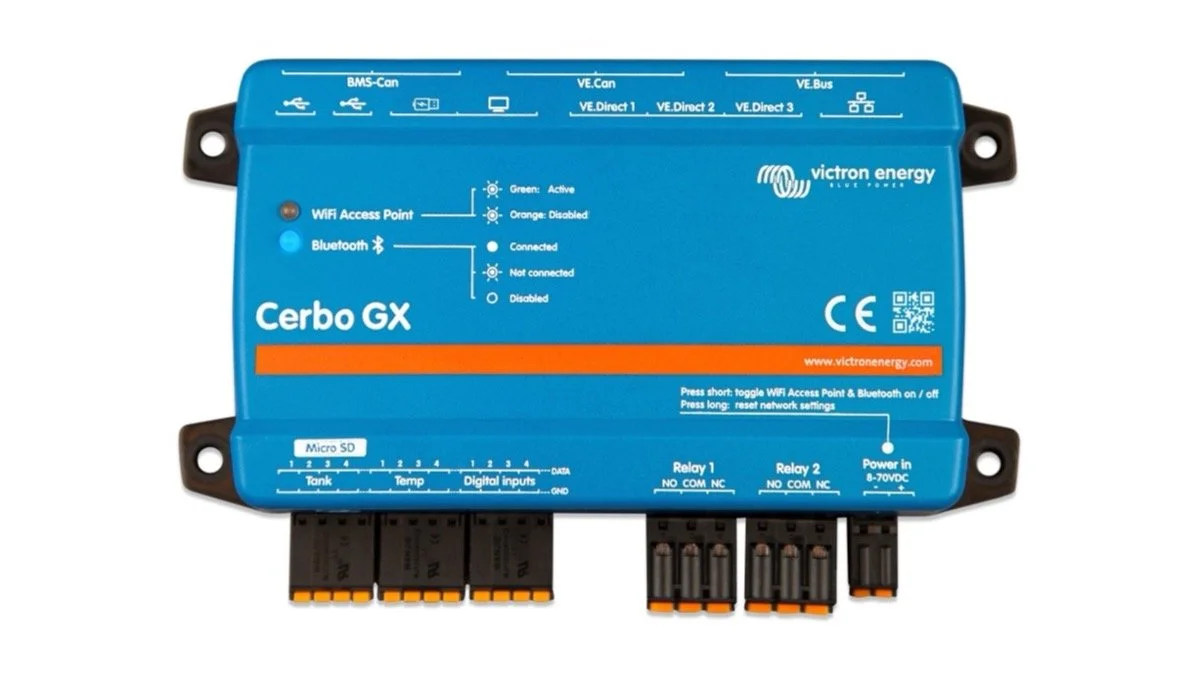
The Victron Cerbo GX is the communication center of a Victron power system: it monitors and controls inverter/chargers, solar chargers, DC-DC chargers and batteries, shows them on a GX Touch screen or chartplotter, and sends the data to Victron's VRM portal for remote monitoring.
What does a Victron Cerbo GX do?
A Cerbo GX is a GX device: a unit running Victron's Venus OS that sits at the core of a Victron installation and links its components.
Its interface, the Remote Console, opens on a GX Touch, a web browser, a phone, a multifunction display (MFD) or remotely through VRM. A Cerbo GX can also:
- pass a lithium battery's charge and discharge limits to chargers and inverters;
- start and stop a generator automatically;
- read tank levels, temperatures and alarm switches such as bilge pumps;
- put Victron data onto the boat's NMEA 2000 network.
Victron also says a GX device is required to integrate its list of supported third-party lithium batteries.
Cerbo GX MK2, MK3 or Cerbo-S GX: which model fits?
In Victron's manual the Cerbo GX MK2 and MK3 share one port list but have different VE.Direct device limits, while the Cerbo-S GX drops tank, temperature and BMS-Can connections.
Victron's current manual covers the Cerbo GX MK2 (BPP900450110, BPP900451100) and MK3 (BPP900451130). Specifications are current at the time of writing.
| Feature | Cerbo GX MK2 | Cerbo GX MK3 | Cerbo-S GX |
|---|---|---|---|
| VE.Direct ports / max devices | 3 / 15 | 3 / 25 | 3 / 15 |
| VE.Can ports | 2, VE.Can 1 isolated | 2, VE.Can 1 isolated | 1, non-isolated |
| Resistive tank inputs | 4 | 4 | None |
| Temperature inputs | 4 | 4 | None |
| Digital inputs | 4 | 4 | 4 |
| Power input | 8–70 VDC | 8–70 VDC | 8–70 VDC |
Victron describes the MK2 as almost identical to the original Cerbo GX, but with two VE.Can ports, so it can run VE.Can and RV-C networks at once; the original and the Cerbo-S GX have one fully functional VE.Can port.
For tank senders, temperature sensors or a BMS-Can battery, choose the full Cerbo GX.
What connects to a Cerbo GX?
A Cerbo GX connects to inverter/chargers over VE.Bus, to battery monitors and solar chargers over VE.Direct, and to VE.Can products and CAN-bus batteries over its CAN ports.
- VE.Bus: Multis, Quattros and other VE.Bus inverter/chargers plug into either VE.Bus port with RJ45 UTP cable. Leave unused VE.Bus ports open and never insert the blue VE.Can terminators into them.
- VE.Direct: BMV battery monitors, MPPT solar chargers, Orion XS and Smart IP43 chargers connect directly; VE.Direct cables are limited to 10 m and cannot be extended.
- VE.Can: VE.Can products use RJ45 UTP cable, and the network must be terminated at both ends.
- Lithium batteries: supported third-party batteries mostly communicate over BMS-Can, as listed in Victron's Battery Compatibility manual.
Our SmartShunt vs BMV-712, Victron MPPT sizing and inverter charger comparison guides cover those devices.
Tank, temperature and digital inputs
Each Cerbo GX tank input takes European (0–180 ohm), US (240–30 ohm) or custom 0–300 ohm resistive senders; mA or voltage senders need a GX Tank 140. Temperature inputs use Victron sensor ASS000001000, read –40 °C to +70 °C and can watch any source; the BMV temperature sensor does not work on them.
Digital inputs can be set as bilge, door, smoke, fire or CO2 alarms or a generator running signal. They use 3.3 V logic and withstand up to 5 V, so Victron recommends a potential-free switch or relay contact. Digital input pins are pulled to ground by a switch; do not apply voltage to any GPIO pin.
DVCC and generator auto start
With a managed CAN-bus lithium battery, DVCC (Distributed Voltage and Current Control) makes inverter/chargers, solar chargers and Orion XS chargers follow the battery's charge and discharge limits. Enable DVCC for a CAN-bus battery only if the Battery Compatibility manual lists it as supported, and not if firmware requirements are not met.
A GX device can also start and stop a generator automatically, with triggers such as state of charge, battery voltage, AC load and inverter overload. The wired method uses Relay 1 as a start/stop contact; keep relay loads within 6 A up to 30 VDC, 1 A up to 70 VDC and 6 A at 125 VAC.
How do you view Cerbo GX data on a GX Touch 50 or a chartplotter?
A Cerbo GX shows its data on a Victron GX Touch 50 or 70 screen, or on a compatible chartplotter through Victron's MFD app or NMEA 2000.
The GX Touch 50 is a 5-inch, 800 x 480 display and the GX Touch 70 a 7-inch, 1024 x 600 display, each in top/wall-mount or Flush versions. One combined HDMI and USB cable connects the screen, and it must be plugged in before the Cerbo GX is powered on.
Victron's MFD app shows batteries, solar, shore power and tanks on the chartplotter and can switch the inverter/charger. It needs an Ethernet cable, plus an adapter for some brands. Victron lists, at the time of writing:
- Garmin: GPSMAP 8400/8600 and 722/922/1222 Plus through OneHelm, with a Garmin Ethernet adapter.
- Raymarine: Axiom, Axiom Pro and Axiom XL on LightHouse 3 or 4, through a RayNet adapter, not Wi-Fi.
- Navico: Simrad NSO/NSS evo3, B&G Zeus 3 and Lowrance HDS over Ethernet.
- Furuno: NavNet TZtouch3 TZT12F, TZT16F, TZT19F and TZtouch2 TZT2BB.
Set the GX device's Local network security profile to Unsecured for the MFD app, because some MFDs (Garmin confirmed) load files without logging in. Make sure the Ethernet cable goes into the Ethernet port, not a VE.Bus or VE.Can/BMS-Can port. The other route, NMEA 2000-out, bridges Victron products onto the NMEA 2000 network through a VE.Can to NMEA 2000 micro-C cable.
How does the Victron VRM portal work?
VRM (Victron Remote Monitoring) is a portal, free as Victron states it, that lets you watch, configure and get alarms from an internet-connected Cerbo GX.
VRM opens the Remote Console and updates firmware of connected Victron products. VRM sends email or push notifications for loss of communication, product alarms, a geofence (needs USB-GPS) and alarms you set. If the connection drops, the Cerbo GX stores several days of logs, even through power loss, and uploads them when it reconnects.
The Cerbo GX gets online by Ethernet, built-in Wi-Fi, a GX LTE 4G modem, a mobile router or phone tethering, preferring Ethernet, then Wi-Fi, then LTE. Victron calls Wi-Fi less reliable than Ethernet and asks for at least 50% signal; the built-in Wi-Fi joins only 2.4 GHz networks. The GX LTE 4G serves only the GX device, so Victron suggests a mobile router where more devices need internet; see also Starlink on a boat.
For custom dashboards and automation, Victron offers Venus OS Large, which adds Node-RED and Signal K Server.
What to check before you buy
A Cerbo GX order should match your devices, battery, sensors and display.
- VE.Direct devices: count them against the MK2's 15 or the MK3's 25.
- Battery: check the Battery Compatibility manual and which port the battery uses.
- Tank senders: confirm they are resistive, or plan a GX Tank 140.
- Display: choose a GX Touch size and mount type, or confirm your MFD is on Victron's list.
- System voltage: if the DC supply exceeds 60 V, the Cerbo GX is a built-in product and the installation must prevent user access to its terminals.
How to install and set up a Cerbo GX
A Cerbo GX installation goes in this order.
- Mount the unit, rated IP20, on a wall or a 35 mm DIN rail with the DIN35 adapter.
- Connect the GX Touch cable before any power.
- Power the Power in V+ connector directly from the battery with the supplied cable and its 3.15 A slow-blow fuse, not from an inverter's AC output.
- Connect VE.Bus, VE.Direct and VE.Can devices, terminating both ends of the VE.Can network.
- Wire tank senders, temperature sensors and digital inputs.
- Connect Ethernet with unshielded UTP cable.
- Open VictronConnect over Bluetooth within 10 m; units from serial HQ2242 have a 6-digit PIN on the label, older ones use 000000 and ask you to change it.
- Go online, register on VRM, then set up DVCC and generator rules.
Common mistakes with a Cerbo GX
Most Cerbo GX problems trace back to power, port or sensor choices.
- Powering it from inverter AC output, so an inverter shutdown takes all monitoring and remote access with it.
- Fitting VE.Can terminators into unused VE.Bus ports.
- Extending a VE.Direct cable past 10 m.
- Using a BMV temperature sensor or an mA tank sender on the Cerbo inputs.
What can an owner do alone, and when is a marine electrician needed?
An owner can usually mount a Cerbo GX, plug in RJ45 and VE.Direct cables, connect a GX Touch and run setup in VictronConnect.
A marine electrician should handle CAN-bus lithium integration and DVCC, generator start wiring and NMEA 2000 bridging, and any system where the Cerbo GX must be enclosed as a built-in product.
How eMarine Systems can help
eMarine Systems works with Victron equipment and can install a Cerbo GX dockside across Miami-Dade, Broward and Palm Beach counties.
eMarine is an ABYC member that started with onboard power. Each project starts with a power demand analysis, system sizing and compatibility verification. Relevant services are Victron installation, NMEA 2000 network integration and a lithium battery upgrade. DIY owners can find monitoring and control parts in eMarine's online store.
eMarine does not sell Starlink service plans, and cost is quoted after an onboard inspection. Call (954) 520-2055.
Frequently asked questions
What is the difference between the Cerbo GX and the Cerbo-S GX?
The Cerbo-S GX has no resistive tank inputs, no temperature inputs and no BMS-Can port, and its single VE.Can port is non-isolated. It keeps 4 digital inputs, 3 VE.Direct ports and VE.Bus.
What changed in the Victron Cerbo GX MK2?
Victron says the MK2 is almost identical to the original Cerbo GX but has two VE.Can ports, so it can connect to VE.Can and RV-C networks at once. The newer MK3 raises the VE.Direct device limit from 15 to 25.
Do I need a GX Touch 50 to use a Cerbo GX?
No, the GX Touch 50 and 70 are optional screens. The Remote Console also opens in a web browser, on a phone or tablet, on a compatible MFD or through VRM.
Does the Victron VRM portal cost anything?
Victron states that VRM is free at the time of writing. It needs a GX device such as the Cerbo GX with an internet connection.
Can a Cerbo GX work without an internet connection?
Yes, the Remote Console works locally, and the Cerbo GX stores several days of logs while offline. The logs upload to VRM once the connection returns.