
Home / Articles / Victron SmartShunt vs BMV-712: Choosing a Battery Monitor for Your Boat
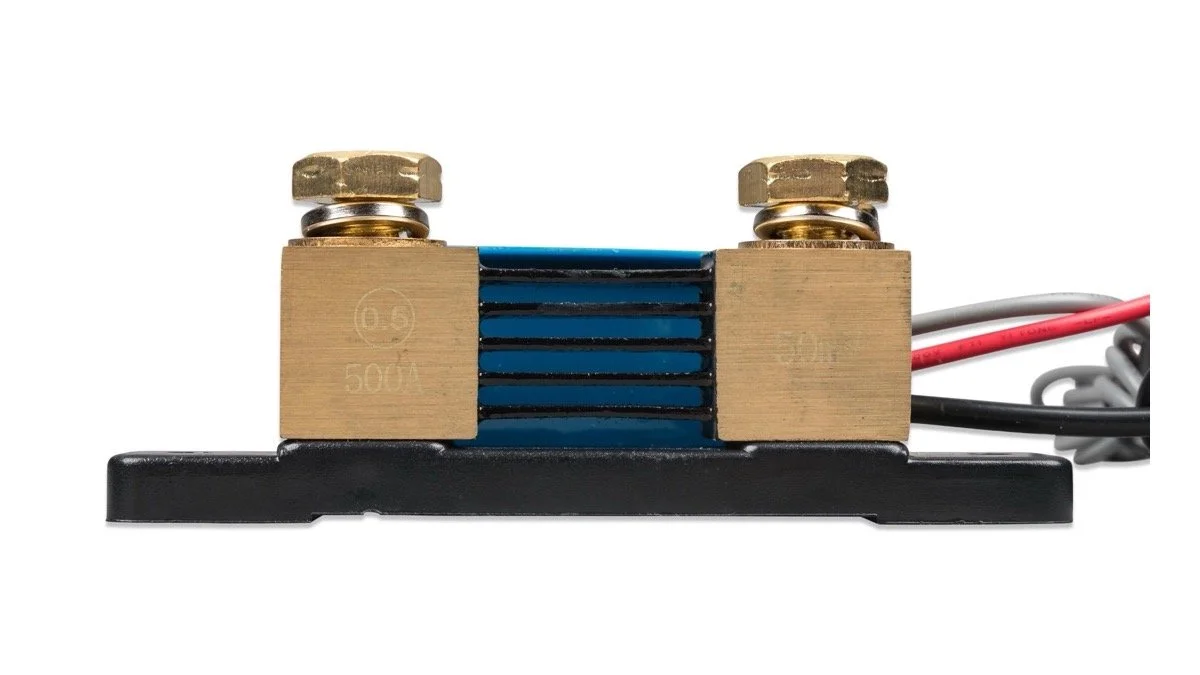
The Victron SmartShunt and the BMV-712 Smart are both battery monitors that measure voltage and current and calculate state of charge and time to go. The Victron SmartShunt has no display and is read by phone app or GX device. The BMV-712 adds a panel display with buttons, a buzzer and a programmable relay.
Why use a shunt battery monitor instead of a voltmeter?
A shunt battery monitor counts the current flowing in and out of the battery, while a voltmeter shows only a voltage that shifts with temperature and other conditions.
The monitor integrates current over time into net amp-hours: 10 A for 2 hours removes 20 Ah.
Voltage misleads in two ways. Some voltage-to-state-of-charge charts are for resting voltage, 12 to 24+ hours with no loads or charging at 77°F, so they do not fit a battery in use. And a LiFePO4 battery keeps a flat voltage through most of its discharge, so 80% state of charge can look nearly the same as 30%. Dakota Lithium says a shunt-based monitor gives a better picture of a lithium battery's energy in and out.
A shunt monitor is still an estimate: Practical Sailor notes a margin of error from chemistry, age, temperature, discharge rate and recharge efficiency.
Victron SmartShunt vs BMV-712: what is different?
The SmartShunt and BMV-712 differ mainly in display, alarms, relay and shunt sizes; Victron lists the same current and voltage accuracy figures for both.
| Feature (at the time of writing) | Victron SmartShunt | Victron BMV-712 Smart |
|---|---|---|
| Display | None; set up and read in VictronConnect over Bluetooth, USB or a GX device | Head unit with display and four buttons, plus VictronConnect |
| Alarms | No buzzer or relay; alarms show in the app while connected or pass to a GX device | Alarm buzzer and programmable relay, 60 V / 1 A, normally open |
| Shunt sizes | 300 A, 500 A, 1000 A or 2000 A | 500 A shunt included; larger shunts up to 9999 A sold separately |
| Protection | IP21, dry location; SmartShunt IP65 version is potted | Shunt is IP21, dry location |
| Aux input | Starter battery, midpoint or temperature, one at a time | Same three options, one at a time |
| Mounting | Shunt only; no dash cutout needed | Flush-mount head unit, 63 mm front diameter, 69 x 69 mm bezel |
Sources differ on BMV-712 Bluetooth: Victron's manual describes Bluetooth as active as soon as the unit powers up, while Battle Born says it comes with a Bluetooth dongle. Victron lists ±0.4% current and ±0.3% voltage accuracy.
Which monitor fits which boat?
The SmartShunt suits owners who read the battery on a phone or GX screen; the BMV-712 suits a boat where everyone sees it on the panel.
Victron SmartShunt. Boating Magazine notes that reading it by phone avoids extra wire runs and dash holes, though it can also be hard-wired to a Victron GX touchscreen. On a boat, metal or seawater around the hull can cut the typical 10–15 m Bluetooth range to an unacceptable level; Victron's fix is a VE.Direct Bluetooth Dongle with the SmartShunt's own Bluetooth turned off.
BMV-712 Smart. All readings and settings are on the head unit, which is flush-mounted in a panel cutout.
What can the BMV-712 alarm relay do?
The BMV-712 relay can act as an alarm relay, start a generator or serve other uses. By default it energizes below 50% state of charge and de-energizes at 90%, which suits generator start and stop.
Which SmartShunt size do you need: 500 A or larger?
At the time of writing, Victron lists the SmartShunt and SmartShunt IP65 in 300 A, 500 A, 1000 A and 2000 A sizes.
Sources differ on the range: Victron's manual lists four sizes, while a 2023 Boating Magazine article lists only 500, 1000 and 2000 A.
How does the auxiliary input work?
The auxiliary input on both monitors watches one extra item: a second battery's voltage, the bank's midpoint, or battery temperature with the optional Temperature sensor for BMV.
- Starter battery: the starter battery negative goes to the system side of the shunt, and a second fused red cable runs from the Aux terminal to the starter positive.
- Midpoint: for 24 V or 48 V banks of batteries in series or series/parallel, the monitor compares the two halves of the string so an alarm can warn of a bad cell or battery.
Only one function works at a time.
What to check before you buy
A Victron battery monitor purchase needs these facts about your boat first.
- Bank voltage within the 6.5–70 VDC supply range and, for the SmartShunt, capacity within 1–9999 Ah.
- Your peak current against the shunt sizes.
- A dry mounting spot near the house bank negative; both standard shunts are IP21.
- Panel space for a 63 mm head unit and 69 x 69 mm bezel, if you want the BMV-712.
- Which single aux function you need.
- Cable distance to a GX device; VE.Direct cables come in 0.3 to 10 m lengths.
How to install a Victron SmartShunt
A Victron SmartShunt installs in the battery negative path, so every load and charger negative passes through it.
Remove rings, bracelets, necklaces and watches first; a battery short can melt them and cause severe burns. Lead-acid batteries can produce explosive gases, so keep sparks and flames away and ventilate.
- Switch off chargers, solar controllers and inverters, then disconnect the bank negative.
- Mount the shunt in a dry location; the standard SmartShunt is IP21 and not waterproof.
- Connect the battery negative to the battery side of the shunt. Nothing else may connect there or to the battery negative terminal.
- Move the negatives of all DC loads, inverters, battery chargers, solar chargers and other charge sources to the system side.
- Connect the red Vbatt+ cable, with its 1 A slow-blow fuse, to the battery positive to power the monitor.
- If used, connect the second fused red cable from Aux to the starter battery positive.
- Connect the battery positive to the boat's DC system through a red battery cable with a fuse or breaker sized for the load, as in Boating Magazine's install.
- Pair in VictronConnect and enter the settings below.
Settings to enter, and why synchronization to 100% matters
Victron's defaults suit lead-acid; change battery capacity, charged voltage, aux function and the state-of-charge synchronization setting.
- Battery capacity: the 200 Ah default must match your bank; for lead-acid, enter the 20-hour (C20) rating.
- Charged voltage: Victron recommends 13.9 V for 12 V lithium and 14.0 V for 12 V lead-acid (27.8 V and 28.0 V on 24 V).
- Peukert exponent: if unknown, 1.25 for lead-acid (the default) and 1.01 for lithium; 1.00 turns it off.
- Charge efficiency: default 95%, meaning 10 Ah in stores 9.5 Ah; Victron recommends 98% for lithium.
State of charge is calculated, so it must regularly re-synchronize to 100% or the reading drifts. With defaults on 12 V, the monitor resets to 100% when voltage exceeds 14.0 V and charge current is below 4% of capacity (8 A for 200 Ah) for 3 minutes.
Switching off the main DC breaker powers the monitor down; the default "Keep SOC" resumes from the last stored value, at the time of writing. On lithium banks left unattended long enough for the monitor's own draw to discharge them, interrupt the positive supply to prevent deep discharge. Sources differ on that draw: the SmartShunt technical data lists under 1 mA, while the lithium warning in the same manual says under 12 mA.
Common mistakes that make state of charge drift
State-of-charge drift on a Victron monitor has known wiring and settings causes, listed in Victron's manual.
- A load or charger negative left on the battery negative: its current is not measured, and state of charge reads high.
- Negative cables reversed through the shunt, which can make state of charge always show 100%.
- Charged voltage too low: a solar boat can falsely jump to 100% at sunset as current tapers.
- Charged voltage too high: the battery never reaches it and synchronization never happens.
- Wrong capacity, so state of charge rises too fast or too slow.
Connecting to a GX device and VRM
Both monitors connect to a Victron GX device, such as a Cerbo GX, with a VE.Direct cable or a VE.Direct to USB interface.
The GX device then shows the monitor locally or remotely on Victron's free VRM portal; see our Victron Cerbo GX article, and our Victron MPPT sizing guide for adding solar.
As an alternative at the time of writing, the Lynx Shunt VE.Can (M10) is a Lynx busbar module with a battery monitor and main-fuse holder, rated 1000 A DC continuous for 12, 24 or 48 V, read only through a GX device or VRM. The Lynx Smart BMS, for Victron Smart Lithium batteries, has a shunt on its negative busbar.
What can you do yourself, and when do you need a marine electrician?
A boat owner can pair the monitor, enter settings and check for drift in VictronConnect.
Moving every negative to the system side is where errors hide. Bring in a marine electrician for heavy battery cable work, crowded negative busbars, wiring the BMV-712 relay to a generator, or a full lithium battery upgrade. Our lithium marine battery guide covers choosing the bank itself.
How eMarine Systems can help
eMarine Systems works with Victron and serves boats dockside across Miami-Dade, Broward and Palm Beach counties.
Each project begins with a power demand analysis, system sizing and compatibility verification. See our Victron installation work, or boat battery replacement if the bank is due. Owners installing their own monitor can find meters and gauges in our online store.
eMarine Systems is an ABYC member. eMarine does not do hull, fiberglass, engine mechanical or propeller work, and installation cost is quoted after an onboard inspection. Call (954) 520-2055.
Frequently asked questions
Does the Victron SmartShunt have a display?
No, the SmartShunt has no display of its own. It is read in VictronConnect over Bluetooth or USB, or through a GX device, and has no relay or buzzer.
Is the Victron SmartShunt 500A enough for my boat?
Boating Magazine advises a shunt size above the battery's maximum current in or out, such as an inverter at full load, so a 500 A SmartShunt fits when that peak stays below 500 A. At the time of writing, 1000 A and 2000 A versions cover larger loads.
Can one monitor track the house bank and the starter battery?
Yes, the aux input on either monitor can read a starter battery's voltage. Connect the starter negative to the system side of the shunt and run the fused aux cable to its positive.
Why does my battery monitor show 100% all the time?
A state of charge stuck at 100% can mean the negative cables through the monitor are reversed. A charged-voltage setting that is too low can also cause false jumps to 100%.